Leave Your Message

How to Choose the Right AC DC Power Supply

Choosing the right AC DC Power Supply begins with the equipment, not the product label. A compact control board, a network switch, and a motor controller can need very different output stability, startup capacity, and thermal performance. The International Energy Agency’s Electricity 2024 report estimates that data centres used about 460 TWh of electricity in 2022. Depending on growth scenarios, consumption could reach 620–1,050 TWh by 2026. This is total electricity use, not power-supply loss, but it shows why efficient, dependable conversion matters in modern equipment.

Start by matching the supply’s input range and output voltage to the real installation. Then check continuous current, startup surges, ripple, isolation, operating temperature, and expected load changes. A unit rated for the average load may still struggle when a device starts or runs inside a warm enclosure. The catch? Datasheets rarely describe every installation condition. Compare manufacturer specifications with the actual load profile, and review recognized safety and efficiency certifications for the target market. The U.S. Department of Energy’s external power supply standards also illustrate that efficiency and no-load consumption are measurable performance factors, not just marketing claims. A datasheet can look reassuring and still hide a poor fit. Leave practical margin, but avoid oversizing without reason; the best choice balances reliability, efficiency, cost, and the space available.

How to Choose the Right AC DC Power Supply

Define the Application and Estimate Its Power Requirements

Start with the equipment the supply will actually serve. List every load, its required DC voltage, and its normal current. A small controller may draw little, while a motor or relay can demand a brief surge at startup. Check those peak values, not just the steady-state figures on a label. If several devices switch on together, estimate their combined demand under that condition.

Then consider how the system will operate. Note the AC input range, expected operating hours, enclosure temperature, and available airflow. Heat matters. A supply rated for a certain output may need to deliver less inside a warm, sealed cabinet; consult its derating curve rather than assuming the full rating is always available. Allow some headroom for startup surges and future loads, but avoid choosing an oversized unit without a reason. It can add cost and may operate inefficiently at very light loads.

A spreadsheet can make an estimate look exact while hiding uncertain readings. Measure current during actual operation when possible, especially for loads with changing demand. Record what you measured and what you assumed. That distinction is useful when the system behaves differently in the field.

Match Input Voltage, Output Voltage, Current, and Power Ratings

Choosing an AC DC power supply starts with the source available at the installation site. Check its input voltage range and frequency, rather than relying on a nominal value alone. For a DC input, confirm polarity and permitted voltage limits. A supply rated for the wrong input can fail before the connected equipment even starts. Small details matter.

Next, match the output voltage to the device’s specified operating range. A close-looking value may still cause unstable operation or excess heat. Check the required current during normal use and at startup; motors, lamps, and capacitive loads can briefly draw more. The supply’s current rating should meet that peak without forcing it to operate at its limit. Leave margin.

Finally, check the power rating, usually expressed in watts. Calculate voltage multiplied by current, then compare the result with the supply’s rated output. For example, a 12-volt load drawing 3 amps needs 36 watts, before allowing for startup demand or temperature-related derating. Read the manufacturer’s derating curve, especially for a supply inside a warm, poorly ventilated enclosure. It is easy to focus on the numbers and overlook the actual conditions; that is a mistake worth revisiting.

Choose an AC-DC Power Supply That Matches Your Load

Each example matches the supply’s DC output voltage to the load. Load power is calculated as output voltage × load current; the supply’s rated current and power meet or exceed the example load requirement. Always check that the supply’s AC input range supports your mains voltage.

Choose Between Linear and Switching Power Supply Designs

How to Choose the Right AC DC Power Supply

Linear and switching power supplies solve the same basic problem, but they behave differently. A linear design is often valued for low electrical noise and simple operation. It can suit sensitive analog circuits or audio equipment. The trade-off is heat: a linear supply may run hot when dropping a large voltage. For example, a unit converting 24 volts to 5 volts can waste considerable energy. Allow space for airflow and check its rated output under your actual conditions.

Switching supplies are usually smaller and more efficient, especially when input and output voltages differ widely. They can be a practical choice for compact equipment or longer operating hours. Their switching action may introduce electrical noise, though, so review ripple specifications and consider filtering if the load is noise-sensitive. A tidy datasheet is not the whole story; wiring, grounding, and nearby components affect real-world performance. It is easy to focus on efficiency and overlook those details.

Tips: Match the supply’s voltage and current ratings to the load, with reasonable headroom. Check temperature and ripple limits. If uncertain, test the supply with the actual circuit before finalizing the enclosure.

Check Efficiency, Safety Standards, Cooling, and Operating Conditions

How to Choose the Right AC DC Power Supply

Check the load before comparing power supplies. Add the voltage and current requirements of every connected device, then allow some headroom for startup surges. A supply rated exactly at the expected load may run hot or shut down unexpectedly. For example, motors and other inductive loads can draw brief bursts of current. That margin matters. Efficiency also affects heat and energy use, especially when equipment operates for many hours. Check efficiency across the load range you expect, not just at the maximum rating.

Safety and operating conditions deserve equal attention. Verify that the unit’s certifications and markings suit your application and region; requirements can vary. Confirm input voltage, output regulation, and protection against overload, short circuits, and overtemperature. Then consider where the supply will sit. A sealed enclosure in a dusty cabinet may need different cooling from an open, ventilated rack. Follow the specified ambient temperature and clearance guidance. In practice, blocked vents are easy to overlook. They can shorten service life, even when the electrical ratings look right. Quiet operation is useful, but not if it comes at the cost of adequate cooling.

Tips: Check the datasheet’s derating curve. Leave clear space around vents, and test the supply under the real load. Recheck after installation.

Verify Load Compatibility and Test the Supply Before Installation

An AC DC power supply may match the connector and still fail under real operating conditions. Check the required DC voltage, continuous current, and polarity against the equipment specifications. Include every connected device in the load estimate, not just the main component. Allow headroom for startup surges and changing demand; motors and lamps can draw more current briefly. Heat matters, too. A supply rated for a cool bench may deliver less current inside a warm, enclosed cabinet. It is easy to overlook airflow when comparing labels.

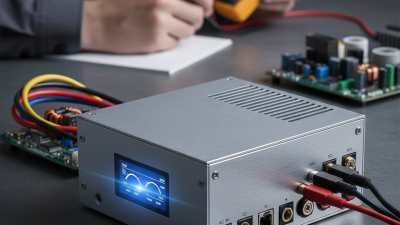
Test the unit before installation, using a suitable load and a multimeter set to the correct measurement range. Confirm that the output voltage stays within the equipment’s permitted limits at light load and near expected operating load. Check polarity before connecting anything. Small mistakes matter. Observe the supply for several minutes; note unusual heat, noise, or unstable readings. Use insulated probes, avoid exposed conductors, and follow the manufacturer’s safety instructions. If readings drift, pause and investigate rather than assuming the device will settle once mounted. A brief bench test cannot predict every condition, but it can reveal a wrong voltage, weak output, or poor fit before access becomes difficult. Sometimes the first estimate is too optimistic; revise it when measured load differs from the calculation.

How to Choose the Right AC DC Power Supply - Verify Load Compatibility and Test the Supply Before Installation
Check Example Load or Condition Supply Requirement What to Verify
Output voltage A device rated for 24 V DC A regulated 24 V DC output, within the device’s permitted voltage range Confirm the load’s nominal voltage and allowable tolerance in its documentation. Do not assume a load accepts a higher voltage.
Continuous current and power 24 V DC at 1.2 A = 28.8 W At least 1.2 A and 28.8 W continuously; a 25% planning allowance gives 1.5 A and 36 W Check both the supply’s rated output current and wattage. The allowance is an example, not a universal rule; follow the load and supply specifications.
Multiple output loads 12 V at 2.0 A plus 5 V at 0.8 A Separate compatible outputs, or suitable conversion stages; total load power is 28 W Verify each output’s voltage and current rating, the combined power limit, and whether the outputs are isolated or share a common return.
Startup and peak current A motor, lamp, or capacitive electronic load may draw more current at startup than during normal operation. A supply with a documented peak-current capability that meets the load’s startup profile Compare startup current and duration with the supply’s overload or peak rating. Check for hiccup, shutdown, or current-limit behavior.
AC input compatibility Installation on a 120 V AC, 60 Hz supply An input rating that includes the local mains voltage and frequency Read the supply’s input label and manual. Do not connect it if the local input is outside its specified range.
Polarity and connections A DC load with marked positive and negative terminals Correct output polarity and connectors rated for the expected current Match the wiring diagram and terminal markings. Check conductor size, secure connections, and any required protective earth connection.
Operating temperature and cooling A supply mounted in a warm or enclosed cabinet A supply whose temperature limits and derating curve cover the installation conditions Allow the specified ventilation clearance. Check whether the rated output must be reduced at higher ambient temperatures or altitude.
Output quality A sensitive control or measurement circuit Output regulation and ripple/noise performance compatible with the load Compare the supply’s specified regulation and ripple/noise with the load’s limits. Use appropriate measurement methods and equipment.
Pre-installation test Supply disconnected from the final equipment A safe, controlled test with the correct input and a suitable test load Inspect wiring, energize according to the manual, measure DC voltage and polarity, then test under an appropriate load. Check for abnormal heating, noise, or shutdown.
Final installation check Supply ready to be connected to the equipment Installation consistent with the supply and equipment manuals and applicable electrical requirements Disconnect power before wiring. Confirm terminals, protection, grounding, enclosure, and ventilation before energizing the completed installation.
Note: Example values are for selection illustration only. Confirm the actual load requirements and supply ratings from their documentation before installation. AC mains testing should be performed by a qualified person using appropriate safety procedures.