Leave Your Message

How to Choose a Power Adapter in 2026?

Choosing a Power Adapter in 2026 means checking more than the connector. A plug may fit while its voltage, current, or charging protocol does not. Start with the device label or manufacturer’s specifications. Note the required output voltage, maximum current, connector type, and polarity. For USB-C devices, check supported Power Delivery profiles; a “65 W” label alone does not guarantee compatibility. Small details matter.

Power-electronics professor Robert W. Erickson is a recognized authority in converter design. A practical paraphrase of his engineering approach is: “Match the power source to the load, then verify the operating limits.” This is not a verbatim quotation. It captures why wattage should never be the only test. Inspect the adapter’s markings, cable rating, and safety certifications for your region. Consider size and heat, too: a compact charger tucked behind a desk may run warm with little airflow. Not every choice is obvious. Some product labels are confusing, and even careful buyers can miss a protocol detail. This guide will compare adapter types, explain compatibility checks, and show how to weigh portability, build quality, and price. The aim is practical: choose an adapter that supplies the right power reliably, without paying for features your device cannot use. A few minutes with the device manual can prevent a poor match. And if specifications conflict, pause and confirm them with the manufacturer.
How to Choose a Power Adapter in 2026?

Understanding Power Adapters and Their Key Specifications

How to Choose a Power Adapter in 2026?
Understanding Power Adapters and Their Key Specifications

A power adapter converts electricity from an outlet into power a device can use. Its label is a useful starting point, not fine print to ignore. Check the input range, such as 100–240 volts, to confirm it suits your local supply. Then match the output voltage to the device’s requirements. A mismatch can cause poor performance or damage.

Current, measured in amps, describes how much power the adapter can provide. The device may draw less, but the adapter should meet or exceed its stated current requirement. For example, a 12-volt device needing 2 amps requires at least 24 watts. Check connector size and polarity, too. A plug that fits can still have the wrong electrical layout. With USB-C, confirm that the adapter and device support compatible power-delivery settings.

Watch for heat. A warm case during use can be normal, but excessive heat or a burning smell calls for unplugging it. Efficiency ratings can help compare energy use, though they do not guarantee suitability. I still find labels confusing when several output options are listed; taking a photo and comparing it with the device manual helps. Small checks matter.

Identifying Your Device’s Voltage, Current, and Connector Requirements

A power adapter is a match only when its electrical output and connector suit the device. Check the device label or manual for input voltage, current, and whether it requires AC or DC. The adapter’s output voltage should match the stated requirement; a mismatch can prevent operation or cause damage. Its current rating should meet or exceed the device’s requirement. More current capacity is generally acceptable, but higher voltage is not a safe substitute. It’s easy to overlook polarity, especially on older DC devices.

Tips: Read the fine print. Compare the adapter’s output label with the device’s input label. Check polarity symbols and connector dimensions, too. A plug that fits may still have the wrong wiring. When in doubt, confirm the specifications in the device manual or ask a qualified technician.

For a barrel connector, measure the outer and inner diameters if the size is unclear; small differences can make a loose or unreliable fit. For USB-C, check that the adapter supports the voltage and power profile your device requires, rather than relying on the port shape alone. After connecting a compatible adapter, watch for unusual heat, noise, or intermittent power. Stop using it if anything seems wrong. A careful label check takes a minute, though I still find connector details surprisingly easy to miss.

Matching Adapter Output to Device Input and Power Needs

Choosing a power adapter starts with the device’s input label, not the adapter’s maximum wattage. Match the required voltage exactly. Check whether the device needs AC or DC, and confirm connector size and polarity. A plug that fits can still be wrong. Read the tiny print near the charging port or in the device manual; those details matter more than a reassuring-looking label.

Current and power need a closer look. An adapter should supply at least the device’s required current, while its voltage stays within the stated range. For example, a 12-volt device rated at 2 amps needs about 24 watts. A higher-current adapter can usually provide extra capacity without forcing it into the device, provided voltage and connector specifications match. With USB-C, check that the adapter supports the voltage and power profile the device requires. Don’t assume every USB-C charger behaves the same.

Check the adapter’s output label before plugging it in. Compare each figure, including polarity symbols, rather than relying on appearance. A little patience helps. If the label is worn or the specifications are unclear, pause and verify them with the device documentation or a qualified technician. It is easy to focus on wattage and miss polarity; that small detail deserves a second look.

How to Choose a Power Adapter in 2026?

Match the adapter’s output voltage to the device’s required input voltage, then choose an adapter with sufficient current and wattage.

Illustrative device profiles: power demand is calculated as volts × amps. Actual requirements vary by model. Check the device label or manual, and confirm connector, polarity, and charging-protocol compatibility. An adapter may provide more current capacity than required, but its voltage must be compatible.

Checking Safety Certifications, Protections, and Compatibility

How to Choose a Power Adapter in 2026?

Checking Safety Certifications, Protections, and Compatibility

Start with the certification, not the price. Look for a recognized safety mark and verify the certificate in the issuing organization’s public directory. For many information-technology devices, IEC 62368-1 is a relevant safety standard; the exact requirement depends on the product and market. A logo alone is not proof. Check that the certificate covers the adapter’s model number, and inspect the casing for cracks, loose pins, or an unusually hot surface during use. Small details matter.

Then match the electrical specifications. For a conventional DC adapter, compare output voltage, polarity, and connector size with the device label. Current capacity should meet or exceed the device’s requirement. With USB-C, confirm support for the device’s required Power Delivery voltage and wattage; USB-IF’s PD 3.1 specification allows up to 240 watts, but that does not mean every charger or cable supports it. Check both. Protection against overcurrent, overvoltage, and overheating is worth confirming in the product documentation. The International Energy Agency’s Global E-waste Monitor 2024 reports 62 million tonnes of e-waste generated in 2022, with only 22.3% formally collected and recycled. That figure is not adapter-specific, but it is a reminder to avoid needless replacements. I still find labels easy to misread. Take a clear photo before buying.

How to Choose a Power Adapter in 2026? — Checking Safety Certifications, Protections, and Compatibility
Dimension What to Check Practical Acceptance Criteria Example or Caution
Input voltage and frequency Read the adapter’s AC input rating and compare it with the local mains supply. For travel, an input rating of 100–240 V AC, 50/60 Hz generally covers mains supplies within that range. Confirm the rating on the adapter itself. A plug-shape converter does not change voltage. A device rated only for 120 V should not be connected to 230 V mains without suitable voltage conversion.
Output voltage Match the adapter’s output voltage to the voltage required by the device. For a conventional DC adapter, use the device’s specified voltage; do not assume that a higher voltage is acceptable. If the device label specifies 12 V DC, a 19 V DC adapter is not a suitable substitute unless the device documentation explicitly allows it.
Output current and power Check the device’s required current or power and the adapter’s rated output. For a fixed-voltage DC supply, the adapter’s rated current should be at least the device’s required current. Power is calculated as volts × amps. A 12 V, 2 A supply can provide up to 24 W at its rated output. A higher current rating is generally acceptable only when voltage, polarity, connector, and other requirements also match.
USB-C Power Delivery Check the device’s supported USB-C charging standard, required wattage, and available voltage/current profiles. Choose a compatible USB-C PD source with sufficient rated power. The source and device negotiate a supported power level; the cable must also be rated for the required current and power. A higher-wattage USB-C PD adapter does not automatically force its maximum power into a compatible device. Compatibility still depends on supported profiles and the cable.
Connector and polarity For barrel connectors, verify the outer and inner diameters, barrel length, and polarity. For USB, verify the required connector and charging support. The connector must fit securely, and the polarity must match the device marking or manual. A connector that appears to fit may have a different size or polarity. Do not rely on appearance alone.
Safety standard or certification Look for a verifiable safety mark or documentation applicable to the destination market and product category. Check that the product identification and documentation correspond to the adapter model. Applicable requirements vary by country and equipment type. IEC 62368-1 is a safety standard, not itself a certification mark. CE indicates a manufacturer’s declaration of conformity with applicable EU requirements; it is not, by itself, proof of independent third-party certification.
Market-specific compliance Confirm that required markings and regulatory documentation are appropriate for where the adapter will be sold or used. Review the relevant national rules and the adapter’s exact category, rating, and documentation. FCC Part 15 concerns electromagnetic interference requirements in the United States; it is not an electrical safety certification. Requirements for marks such as UKCA or Japan’s PSE depend on applicable rules and product category.
Protection features Check the manufacturer’s technical documentation for over-current, over-voltage, short-circuit, and over-temperature protection. Prefer clearly documented protections and operating limits. Protection behavior and reset conditions can differ between models. A feature list is not a substitute for applicable safety compliance, correct ratings, or reliable product documentation.
Efficiency and heat Review the stated efficiency, standby power information, ventilation guidance, and normal operating-temperature limits. Choose an adapter that meets applicable efficiency rules for the destination market and use it with the airflow described in its instructions. Some warmth during operation can be normal. Stop using an adapter that smells burnt, makes unusual noises, has damaged insulation, or becomes abnormally hot.
Physical condition and documentation Inspect the casing, cable, plug, labels, and instructions before use. Use an adapter with legible ratings, intact insulation, a secure plug, and documentation identifying its intended use and limitations. Do not use a cracked, frayed, modified, or unidentified adapter. Replace damaged equipment rather than attempting an improvised repair.
Final compatibility check Compare the adapter’s input, output, connector, polarity, charging protocol, and intended environment with the device requirements. Every required electrical and physical specification must match; where documentation is unclear, consult the device manufacturer or a qualified technician. This table is a general selection guide, not a substitute for the device manual or local electrical regulations. Product requirements and regulations can vary by model and jurisdiction.

Comparing Adapter Types for Home, Travel, and Specialized Use

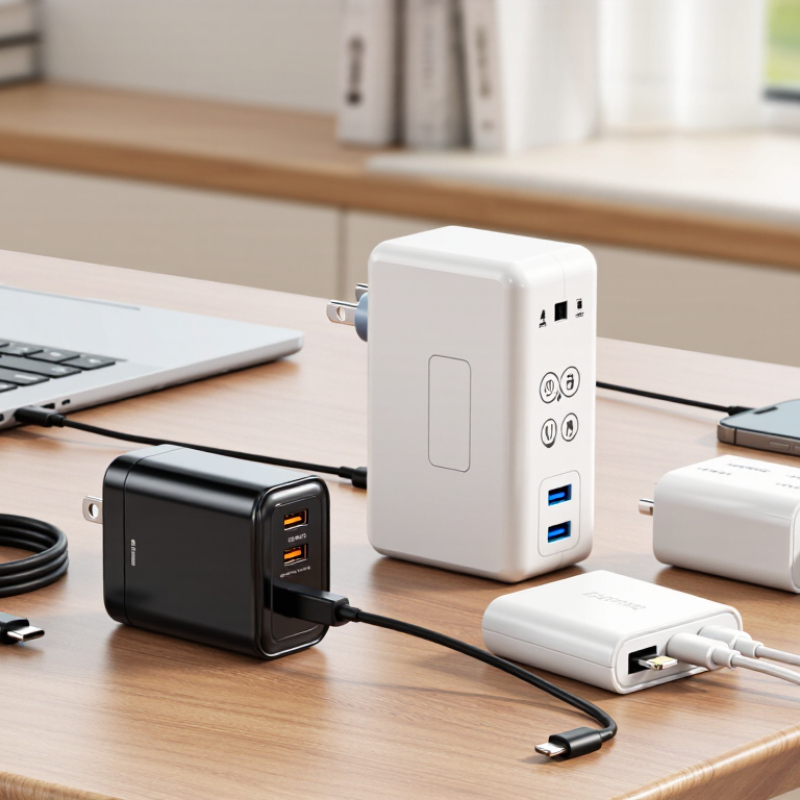
For home use, a single-port USB-C adapter keeps a desk uncluttered and suits one phone or tablet. Choose output wattage that meets the device’s stated requirement; extra capacity is generally fine when the device controls its own draw. A multiport adapter is useful for a phone, earbuds, and tablet, but check whether its total output is shared. One busy evening can expose that limitation. For older equipment, match the adapter’s voltage, current capacity, connector size, and polarity exactly.

Travel adapters solve a different problem. A plug adapter changes the outlet shape, but it does not necessarily convert voltage. Check the input range printed on each device before connecting it abroad. For frequent trips, a compact USB-C charger with foldable pins can reduce bulk, though it may not power every laptop. Specialized equipment may need a dedicated AC-to-DC supply, a precise connector, or stable output. Follow the device maker’s specifications; a connector that fits can still be electrically wrong.

Tips: Read the small label before buying. Compare watts, voltage, and connector details. Pack one tested cable. Leave room for uncertainty: labels can be hard to read, and travel outlets vary.